
This is something that I have wanted for a while now, but just hasn’t reached a point for me where I felt like I needed to spend the time. Now with Inventor 2025 and the upgrade from .NET Framework to .NET8 it has brought things to a head. Perhaps others have already come up with their own solution on this but here is what I ended up doing.
When publishing to the store, the Autodesk suggested package format is to have all of the different Inventor releases in a single folder, with sub-folders for each of the versions and updates to the different .addin files to include/exclude from the the different versions of Inventor.
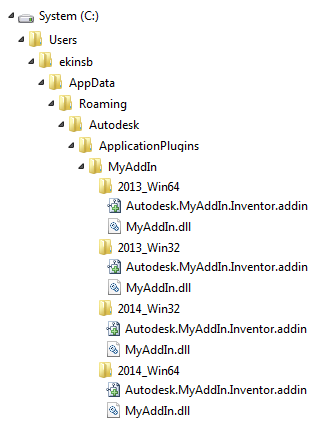
The above image is from the Inventor help docs and shows an example of this structure. It would be nice if there was a way to automate these directory structures and more importantly, automate the updates of the addin files to correctly reflect which version of Inventor to load into.
There is nothing magical about this, as long as it is command line compatible, just pick a tool and do it. I ended up building a command line tool in .net that will allow you to specify the path to the .addin file and update the version information in the file to reflect the version of Inventor you are loading into. Then I added to a powershell script to setup the package that gets submitted to the Autodesk store. Here is an example of what that looks like
addinxform.exe update --addinpath "C:\users\mike\AppData\Roaming\Autodesk\ApplicationPlugins\Sample.Inventor.addin" --SupportedSoftwareVersionGreaterThan "25.0.0" --SupportedSoftwareVersionLessThan "29.0.0"
In the example above, the desired addin file has its SupportedSoftwareVersionGreaterThan and SupportedSoftwareVersionLessThan tags updates to effectively have the addin loaded in Inventor 2021 through 2024.
The above command line is called from a powershell script that builds the solution, copies the output to a store package location, output files are signed and the addin file is updated. If there are other builds (such as for Inventor 2025), these files are signed and the addin file updated as required.
The utility also has a deploy command which you can use to deploy your addin file locally and have it setup to refer back to your development output for debug purposes.
I have put the code for this utility into Github. If you like you can fork it and adapt it to your own purposes or submit issues.
 random bits and bytes